 » Workday
Workday is now live!
Workday launched on June 29, marking an important milestone for Northwest. The launch represents a significant step forward in modernizing university processes and enhancing the employee experience. Platform Services impacted include HCM (Human Capital Management), FIN (Financials), PATT (Payroll, Absence, and Time Tracking).
Thank you to employees across campus for their engagement, training participation, and support throughout the transition.
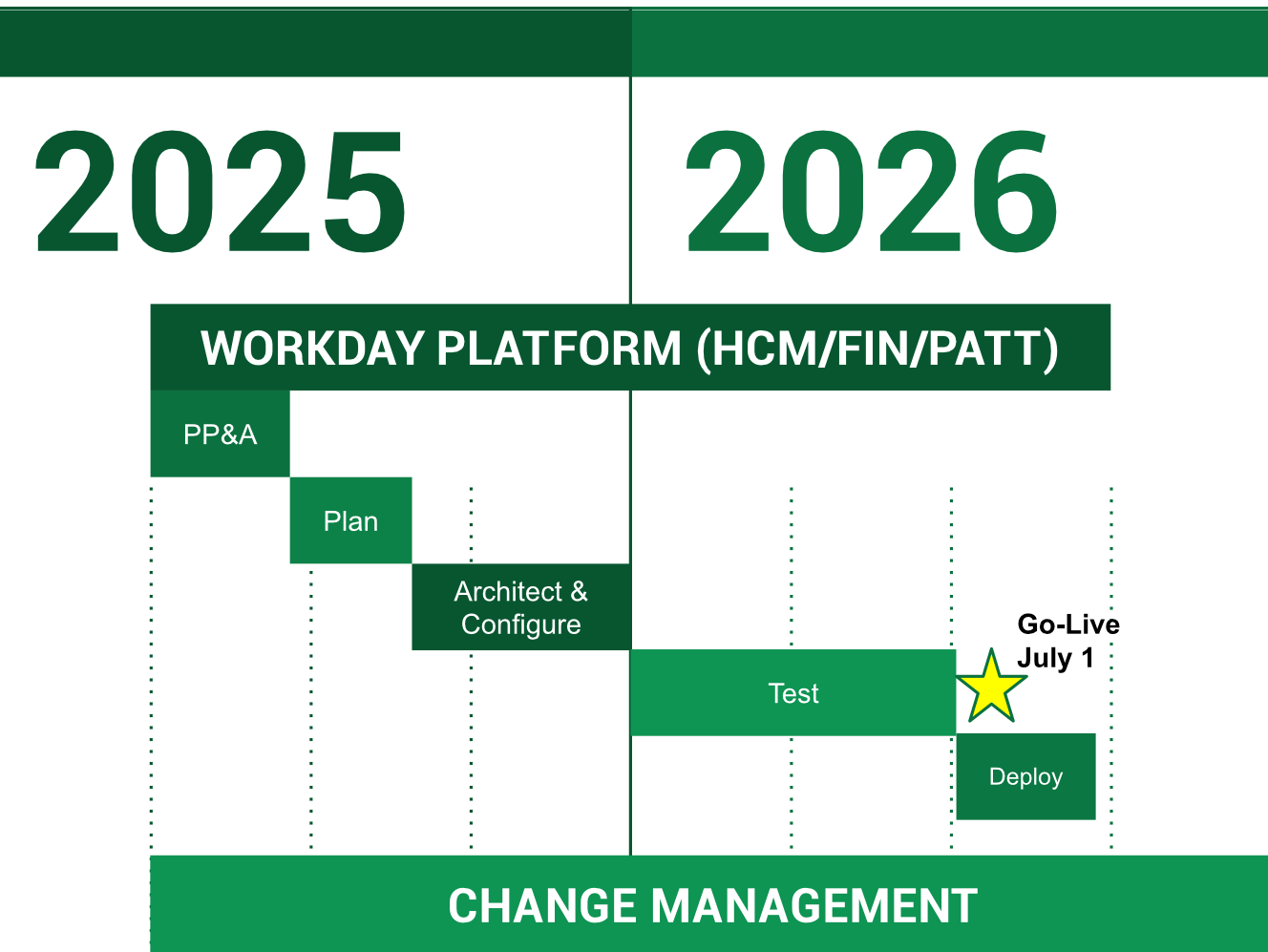
The Pre-Planning and Alignment stage helps our project team and our partner, Alchemy, get on the same page. Alchemy provides us with tools, tasks and information to get ready for the Workday project to go live. This also includes setting up and scheduling our workshop activities.
The Plan stage is when we officially start the project and set up how we'll manage it. During this time, the project leaders will outline and check the project’s goals, schedule, key dates, what we need to produce, who's involved and each person’s responsibilities. This stage kicks off with a meeting to start planning and finishes when we have the basic setup for the system.
During the Architect and Configure stage, our goal is to make sure everyone on the project team — both from Alchemy and the customer — understands Northwest's business needs. We'll figure out how Workday can be used to meet those needs and then set up the system according to the agreed-upon details. We'll go over Workday features and how they work in design sessions, using the actual system as a reference. Then, Northwest will confirm the setup during a series of workshops.
The Test stage is all about making sure the system works well for Northwest's needs. Each test has a specific goal, and we'll set clear rules for starting and finishing tests in the Test Plan. Northwest will do the testing, with the Alchemy team guiding them. We'll have regular check-ins to see how testing is going and address any problems. We need to meet all the testing requirements to move forward. Plus, Alchemy will teach Northwest how to manage and update the system during this phase.
During the Deploy stage, the Workday application goes live at Northwest. We'll complete several checks and tasks from the Deployment Plan (cutover checklist) to make sure everything is ready before we switch over. Once Workday is live, Alchemy will help Northwest with a final data transfer or update.