Gain access to Google Analytics or Siteimprove
Faculty and staff with Northwest credentials can be granted access to Google Analytics or Siteimprove. Contact the Webteam at webteam@nwmissouri.edu to request access and training as needed.
Accessibility
Our office uses Siteimprove to help with accessibility on the web. Siteimprove’s web accessibility tools enable you and our office to easily follow and adhere to international Web Content Accessibility Guidelines (WCAG) across all conformance levels (Northwest has a goal to maintain AA conformance). In addition to keeping the Northwest Website compliant, the Web Team can help you with the following:
- Share an accessibility report showing that your section of the Northwest website is compliant
- Grant access to Siteimprove to manage on your own
- PDF Accessibility help
- With access to Siteimprove we can help you with reporting to check PDFs on the web for accessibility
- Web Team can download and share all documents so you can make adjustments
Contact webteam@nwmissouri.edu for access to Siteimprove.
More Resources for website accessibility at Northwest
Siteimprove & Accessibility - Info & FAQs
I was named a "website coordinator" for my department/program/area, what does that mean?
As the website coordinator, you're an integral part of the digital compliance initiative, your role is to take responsibility in maintining digital content (website, third-party software, etc). You aren't expected to fix everything, but rather take charge in helping keep content, PDFs and information current and accessible.
A training session is available to review to assist in understanding your expectations and your available tools. You can watch the session from 09/15/2026 here: Web Accessibility Workshop.
Are the web pages I am responsible for updated and accessible on the Northwest website?
- Yes. The Web Team uses Siteimprove to help with accessibility on the web. Siteimprove’s web accessibility tools enable you and our office to easily follow and adhere to international Web Content Accessibility Guidelines (WCAG) across all conformance levels (Northwest has a goal to maintain AA conformance).
How do I login to Siteimprove?
Login at Siteimprove.com
- Your login is your Northwest email, but NOT your Northwest password. You will set up your account on your own.
*Web Monitoring Dashboard - Accessibility and PDFs (in Siteimprove)
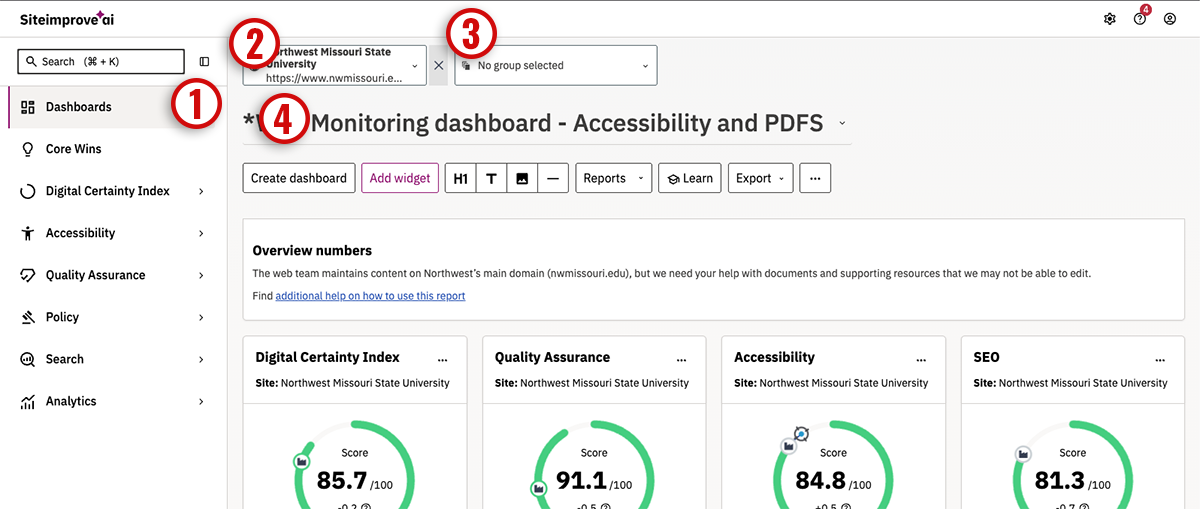
A dashboard is set up (called *Web Monitoring dashboard - Accessibility and PDFS) in Siteimprove to help users manage content on the web. It is intended to:
- Help keep track of what pages or documents need modified or removed
- Help identify PDFs that need remediation for accessibility
To use the *Web Monitoring dashboard - Accessibility and PDFS report:
Login to siteimprove
- Select dashboards in the left navigation.
- Ensure the correct site is selected: Northwest Missouri State University
- Ensure the correct groupis selected: 'select the group relevant to you'
- Select "*Web Monitoring dashboard - Accessibility and PDFs" in the dashboard dropdown
- feel free to browse the many other dashboards and learn more about your web content
How to correct "Heading is not Descriptive" for accessibility? And other things that aren't straightforward.
A note to start - Siteimprove is a robot crawler - some issues flagged take human review. “Heading is not descriptive” is one, of many, of those things.
Heading not descriptive:
- We recommend using Siteimprove to learn Siteimprove. It provides information about any issue it flags while using the tool. In this case: when viewing the issue presented, it will give you some context/description to better understand why its a potential issue.
For Bio pages (contact an individual)
- Biography pages are often flagged because the crawler doesn’t THINK it’s enough description, but using our judgement you can determine that the information is about an individual person, so it is enough for this case.
- So, this issue can often be dismissed.
- Open a page report by clicking into the asset on Siteimprove.
- Click the edit button (pencil icon) next to the issue and follow the steps to help “train” Siteimprove.
- This will solve this instance. Refresh your browser to see if the issue remains.
I fixed something, but its still in Siteimprove, why?
- Siteimprove dashboard delay - Siteimprove rescans the site every 5 days, but you can force a rescan of a page or document by clicking the 'circling arrow' refresh icon next to the asset.
There are things I don't know how to fix, what do I do?
- Leadership and the web team will always be here to assist, but the volume of content on the web makes it difficult to fix all the issues without input from content managers/web coordinators.
- You aren't expected to fix anything on your own, web team will assist correcting any issue you find.
 » Marketing and Communication » Web Services » Advanced Improvements